Glossary
This page explains the words Intelligent Routing uses. Each word means the same thing on every page of the app and in every guide.
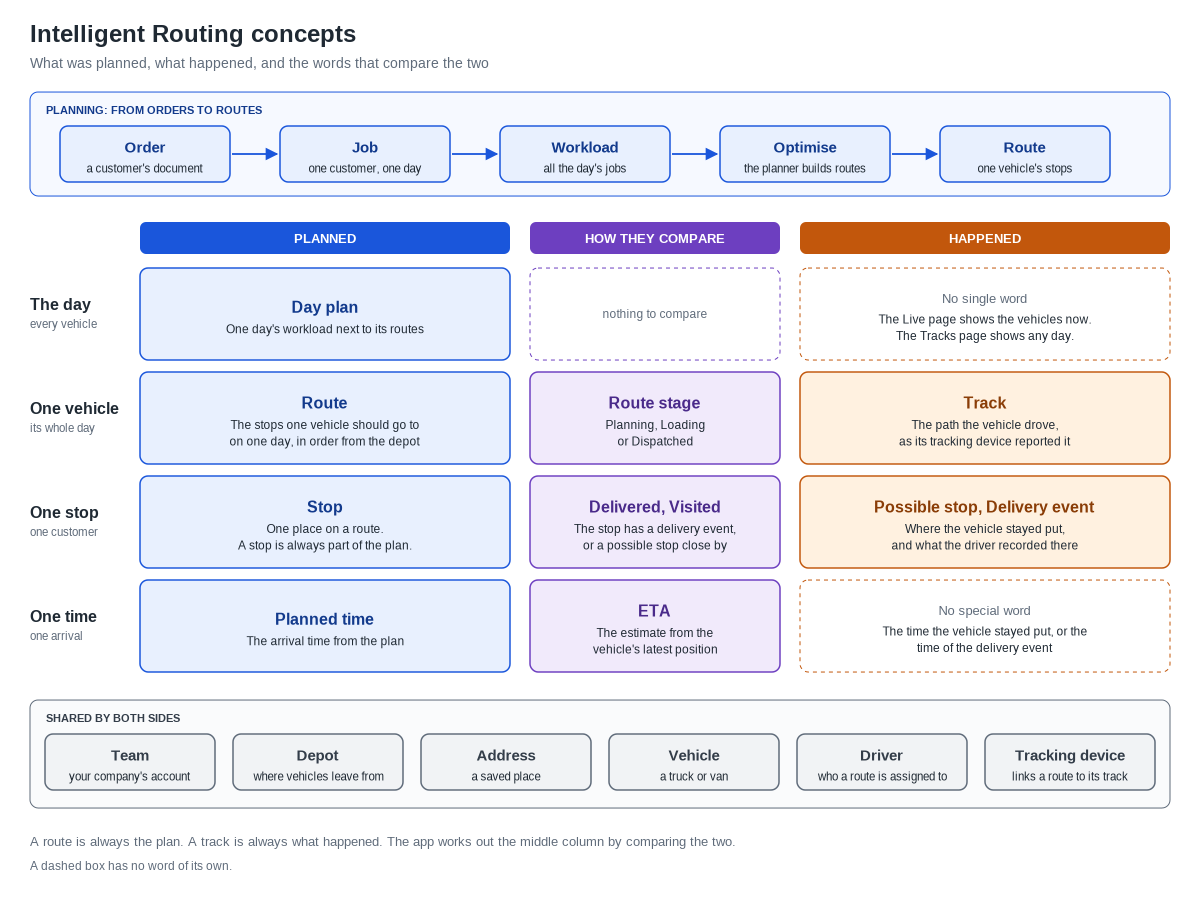
The picture below shows how the main words fit together. A route is what you planned. A track is what happened. The words in the middle column compare the two. Select a picture to open it at full size.
Your team
Team
A team is your company's account. Everyone in a team shares the same address book, orders, routes and vehicles. You manage it under Team management.
Team administrator
A team administrator is a team member who can change the team's settings.
Depot
The depot is the address your vehicles leave from. A team has one depot. Every route starts there, and most routes end there too.
Addresses
Address book
The address book is the list of places your team delivers to. You save each place once and use it again on any route.
Address
An address is one place in the address book: a name, a point on the map, and what you know about delivering there.
Customer code
A customer code is your own short code for a customer, such as an account number. Intelligent Routing uses it to match an order to an address. Two customers at the same place stay separate, because they have different codes.
Delivery window
A delivery window is the time of day when a customer can take a delivery, for example 08:00 to 12:00. Optimise keeps to it.
Delivery zone
A delivery zone is an area you name, to group addresses together. See Delivery zones.
Orders and the day
Order
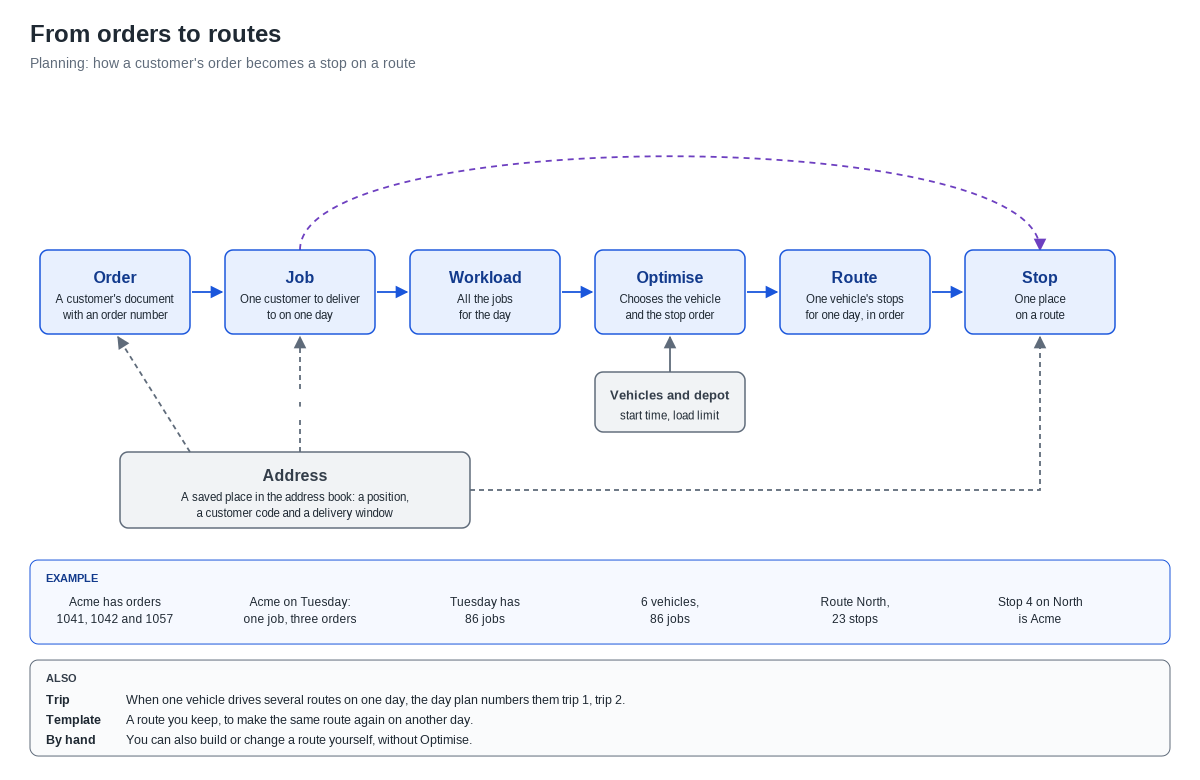
An order is something a customer needs on a day. It comes from your order system or from a sheet you add. An order has an order number and belongs to one customer.
Day plan
The day plan is the page for one day of deliveries. It shows the day's workload next to its routes. See Day plan concepts.
Workload
The workload is everything you need to deliver on a day. It is made up of jobs.
Job
A job is one customer to deliver to on a day. A customer with three orders is still one job, with all three order numbers on it.
Scheduled
A job is scheduled when a stop on one of the day's routes matches it. A stop matches a job when both have the same address or the same customer code. A job that is not scheduled still has to be planned.
Routes
Route
A route is the stops one vehicle should go to on one day, in order. It starts at the depot. Guides also call it a planned route. A route is always a plan. The path a vehicle really drove is its track.
Template
A template is a route you keep, to make the same route again on another day.
Stop
A stop is one place on a route. Each stop has a number, which is its place on the route. A stop is always part of the plan. Some older screens call a stop a waypoint. It is the same thing.
Planned time
A stop's planned time is when the vehicle should arrive there, according to the route as it was planned. Once the vehicle is on the road, Live works out an ETA as well.
Route stage
A route's stage says how far along it is: Planning, Loading or Dispatched. See Route stages.
Loaded
A stop is loaded when its goods are on the vehicle. See Loaded stops.
Vehicle
A vehicle is a truck or van that drives a route. It has a start time and a limit on what it can carry.
Driver
The driver is the team member a route is assigned to.
Trip
A trip is one of several routes that the same vehicle drives on one day. The day plan numbers them trip 1, trip 2 and so on.
Trip sheet
A trip sheet is the printed list of a route's stops that the driver takes along.
Planning
Planner
The planner is the page that builds routes for you. You give it jobs and vehicles, and it works out which vehicle takes which job and in what order.
Optimise
To optimise is to let Intelligent Routing choose the order of the stops, or which vehicle takes which job, so that the vehicles drive less and still keep to every delivery window.
On the road
Intelligent Routing uses one set of words for what you planned and another for what happened.
- A route is planned. A track is what the vehicle drove.
- A stop is planned. A delivery event is what the driver recorded there.
- A stop is planned. A possible stop is a place where the track shows that the vehicle stayed put.
- A planned time is planned. An ETA is worked out from where the vehicle is now.
- Delivered compares the two: it says that a planned stop has a delivery event.
- Visited compares the two as well: it says that a planned stop has a possible stop close by.
Tracking device
A tracking device reports where a vehicle is. It is either a phone that runs the driver app, or a vehicle tracker fitted to the vehicle. A route is linked to a tracking device, so the app knows which vehicle is driving it. Some screens call it just a device. It is the same thing.
Driver app
The driver app is the app on the driver's phone. It reports where the vehicle is, and the driver records a delivery event in it at each stop. A phone that runs the driver app is one of the two kinds of tracking device.
Vehicle tracker
A vehicle tracker is a tracking device fitted to the vehicle and connected to Intelligent Routing through your tracking company. It reports where the vehicle is and nothing else.
Tracker-only
A route is tracker-only when its tracking device is a vehicle tracker. Nobody on that vehicle can record a delivery event. See Live concepts.
Live
Live is the page that shows where your vehicles are now.
Track
A track is the path a vehicle drove on one day, as its tracking device reported it. A track is what happened. The plan is the route.
Track point
A track point is one position on a track, with the time the tracking device reported it.
Possible stop
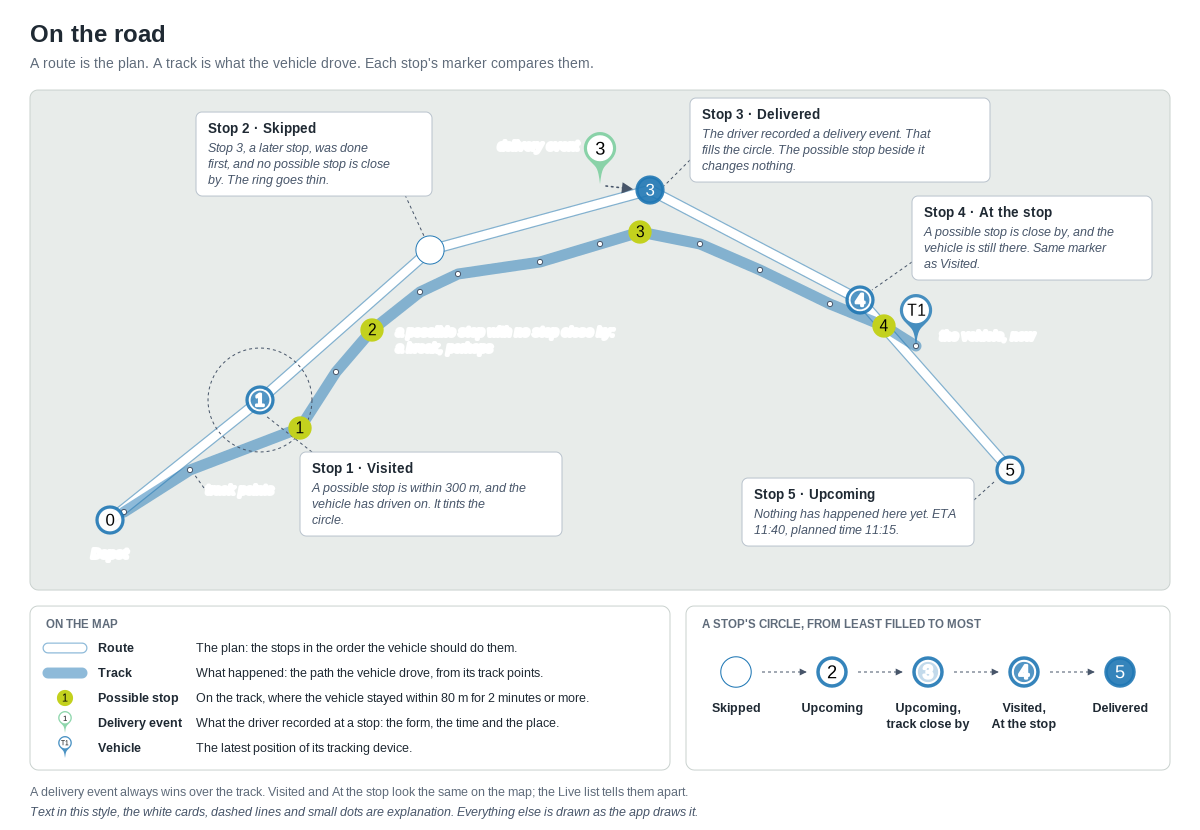
A possible stop is a place where a track shows that the vehicle stayed put for 2 minutes or more. A possible stop isn't always a delivery. Intelligent Routing detects it from the track. Nobody records it.
Close by
Close by means within 300 m of a stop. A track is close by when one of its track points is. A possible stop is close by when the place where the vehicle stayed put is. The distance is the same on every page.
Delivery type
A delivery type is the form a driver fills in at a stop, for example a signature and a photo. Your team chooses what each form asks for.
Delivery event
A delivery event is what a driver recorded at a stop: the filled-in form, with the time and the place.
Delivered
A stop is delivered once it has a delivery event. A delivered stop can't be removed from its route. On Live, Delivered is one of a stop's statuses, and it wins over anything the track shows.
Visited
On Live, a stop is Visited when a possible stop is close by and the vehicle has left. Visited comes from the track. It does not make the stop delivered.
At the stop
On Live, a stop is At the stop when a possible stop is close by and the vehicle is still there.
Done
On Live, a stop is done when it is Delivered, or when it is Visited on a tracker-only route. Live works out no new ETA for a done stop. Done is not the same as delivered: a Visited stop is done although nobody confirmed the delivery.
Skipped
A stop is skipped when it isn't done and comes before the stop that was done last. Live doesn't send the vehicle back to a skipped stop when it works out ETAs. On Live, a skipped stop has the status Skipped and is drawn as a white circle with a thin outline. A skipped stop that has a possible stop close by keeps the status Visited or At the stop. See Skipped stops.
Not visited
On the Route / track comparison page, a stop is Not visited when no possible stop is close by and the stop has no delivery event. Live doesn't use this word. On Live, see Skipped.
Upcoming
On Live, a stop is Upcoming when it has none of the other statuses: it isn't Delivered, Visited, At the stop or Skipped.
ETA
An ETA (estimated time of arrival) is when the vehicle should arrive at a stop, worked out from where the vehicle is now. It can differ from the stop's planned time. Live shows ETAs for today's routes. See How the ETA follows the vehicle.
Driver ETA page
The Driver ETA page shows one stop's ETA. You can share its link with the customer at that stop.